How to Sync Your Breaks With Twitch's Ad Schedule (Without Losing Revenue)
In the Reddit thread we covered in our last post, one pattern kept coming up: streamers who take breaks aren't just stepping away randomly. They're timing it to their ad breaks. Ads run, they stretch, refill water, hit the bathroom, and they're back before the ad ends.
It turns out this isn't just a smart habit; it's a healthy one — and you can earn money doing it.
Here's the setting that makes it work, and how to find it.
The Setting: Twitch's Ads Incentive Program
The requirement is simple: run a minimum of 3 minutes of ads per hour of stream. Hit that consistently, and your ad revenue share will be 55%. Miss it, and you default back down.
This is exactly why so many streamers in our Reddit research described their break routine as "ads run, I step away, I'm back by the time it's done." They're syncing two things that were always meant to happen together: the mandatory ad break, and their own personal break.
Our recommendation: schedule 3 minutes, once per hour, no more. It's short enough that it won't fatigue your viewers, and it's the minimum needed to stay inside the 55% tier, where dropping below can pull your split back down. There's not a huge revenue upside to running more than the minimum, and there's a real downside to running less.
Where to Find This in Your Creator Dashboard
You can manage this directly from Twitch's Stream Manager. Here's where to look:
- Navigate to dashboard.twitch.tv to open your Creator Dashboard.
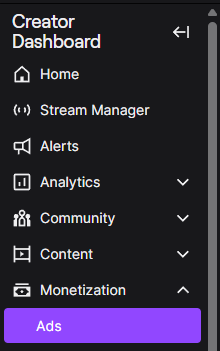
- Choose Monetization, then select Ads.
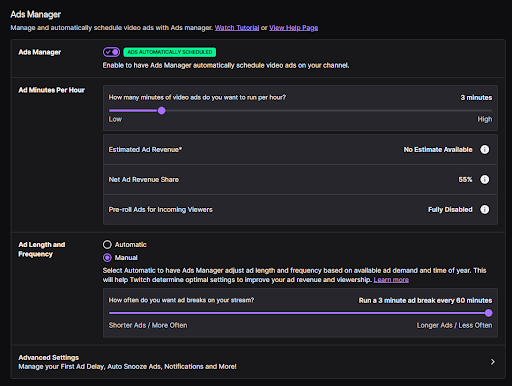
- Set the ad break length to 3 minutes per hour.
- Set the frequency to Manual, capped at once per hour.
Inside Ads Manager, enable automatic scheduling and dial in the numbers. With 3 minutes per hour set, Twitch shows your Net Ad Revenue Share at 55%, and pre-roll ads for incoming viewers are fully disabled:
Why the Screen Still Matters
Setting the schedule solves the revenue side. It doesn't solve the other problem our Reddit research surfaced: what's actually on screen while the ad runs.
A static BRB scene doesn't hold attention. Break Games naturally hits that sweet spot, because the games were made as advertisements first. They were branded campaigns from some of the most well-known brands. Now, redesigned and improved, they're available for all creators. You can read more about the history of our games here.
Sync your ad schedule to 3 minutes an hour. Use that window for your own break. And give chat something to do while you're both away.
See how Break Games fits into your break schedule.